Notes on Scraping SERP
SERP is the abbreviation for 'search engine result page'.
Background
In our project, our ultimate goal is: given a recommender's name, we want to find all books on Amazon for which the recommender's name appears in the 'Editorial Review' section.
We discomposed the project into several steps, the first one is: given a recommender's name, to acquire a list of amazon urls which point to books that are possible to have the recommender as an Editorial Reviewer.
The way to achieve this sub-goal is through scraping SERP
Scraping SERP is different from scraping static webpages
1. Headers are essential
The first attempt is to scrape the search result page the same way as we scrape a static page.
If we input url: http://search.aol.com/aol/search?s_chn=prt_main5&v_t=comsearch&page=2&q=%22Editorial+Reviews%22+%22Gary+Klein%22+%22Books%22+site%3Aamazon.com&s_it=topsearchbox.search&oreq=915eda57a04c423ab462f6b0a41cbb94
into the address bar of the browser, the search result returned by the browser looks like this:
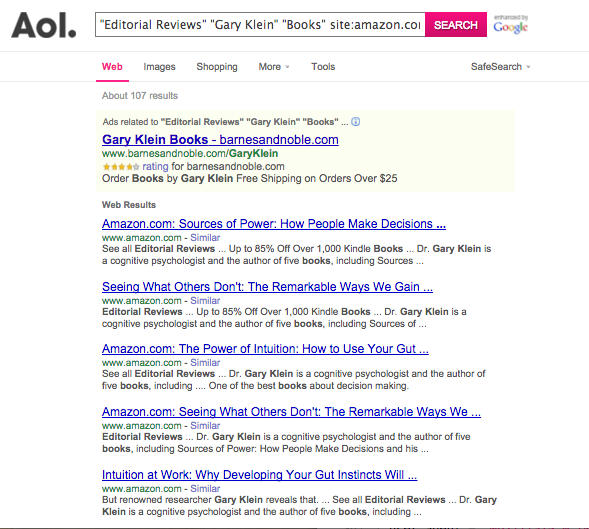 Note that this url does not work all the time, even in a bowser. See code
'1sTry/amazon/scrapingAmazonURL_AOL_ver1.py' in my repository, function formURL() should be
adjusted when search url formatting changes.
Note that this url does not work all the time, even in a bowser. See code
'1sTry/amazon/scrapingAmazonURL_AOL_ver1.py' in my repository, function formURL() should be
adjusted when search url formatting changes.
now with this url in hand, try to scrape this webpage like an ordinary page:
I use the code below:
from urllib2 import urlopen, HTTPError
from bs4 import BeautifulSoup
import requests
q0 = '%22Editorial+Reviews%22+%22Gary+Klein%22+%22Books%22+site%3Aamazon.com'
page = 2
url = 'http://search.aol.com/aol/search?s_chn=prt_main5&v_t=comsearch&page='+str(page)+'&q='+q0+'&s_it=topsearchbox.search&oreq=915eda57a04c423ab462f6b0a41cbb94'
html = urlopen(url)
response = html.read()
bsObj = BeautifulSoup(response)
bsObj.h3
#result: <h3>Your search returned no results.</h3>
for a in bsObj.findAll('a', href=True):
    print(a['href'])
In the result for the last commend, no amazon.com url is found, this scraping attempt is failed.
2. Knowledge of Proxies are required
Almost all search engines restrict the number of page downloads from each user, AOL is no exception.
To see how this is an issue, see code '1sTry/amazon/scrapingAmazonURL_AOL_ver1.py' in my repository. In this piece of code, if I search for Gary Klein (see line 14, 17), the result count is 107. With 10 results per page, I only need to require for 11 pages when executing codes from line 57 to 65. Everything is fine, I successfully get 10 amazon urls per page, 102 amazon urls in total (5 search results are missing, I'll look into this later).
However, if I search for Steven Pinker (see line 15, 16), the result count is 975, that is 98 pages of content to acquire. This time, in executing line 57-65, only 20 pages are scraped. The rest of the queries will be denied. For denied requests, the returned value for the request is string 'Request denied: source address is sending an excessive volume of requests.'
That's why we need proxies.
With proxies it looks like our requests come from multiple users so the chance of being blocked is reduced.
Each proxy will have the format login:password@IP:port
The login details and port are optional. Here are some examples:
bob:[email protected]:8000 219.66.12.12 219.66.12.14:8080
This a free proxy. lists of proxies are not reliable, because so many people use them and they stop working very often. So professional scrapers rent their proxies from a provider like packetflip, USA proxies, or proxybonanza. (source:https://webscraping.com/blog/How-to-use-proxies/)
Other ways to solute the blockage issue include: other ways to randomly vary the User-Agent header; wait for random amount of time then scrape the next page...
try using Bing Search API
Why Bing
- Bing Search API has 5,000 free requests per month, it is possible to accomplish our goal if we use it efficiently.
- I haven't tested this yet but I think using an API can help us getting around with the blockage issue we encounter when scraping SERPs.
- I can simply test the service URI in a browser. To try a service URI, simply paste it into the address bar of the browser. The Bing Search API supports Basic Authentication so user will be prompted for a user name and password. Just leave the user-name field empty and copy the user's account key into the password field. The browser will display the results from the Bing Search API, or prompt the user to save them depending on the browser and how it’s configured. example: https://api.datamarket.azure.com/Bing/Search/Web?Query=%27%22Editorial%20Reviews%22%20%22Gary%20Klein%22%20site%3AAmazon.com%27&$top=50&$format=json paste the url above to into the address bar of the browser and then the json search result can be viewed in the browser.
Search Operator
For both AOL and Bing, the search query remains the same. We simply search for: "Gary Klein" "Editorial Reviews" "Books" site:Amazon.com Most of Google's search operators and Bing's search operators are the same. See this link for reference.
Miscellanea
Test in browser is fine. Got a SSL error when requiring from Python. Assigning verify=false solves the problem.